
You Won't Believe Your Android Can Replace These 5 Gadgets – Discover the Shocking Truth!

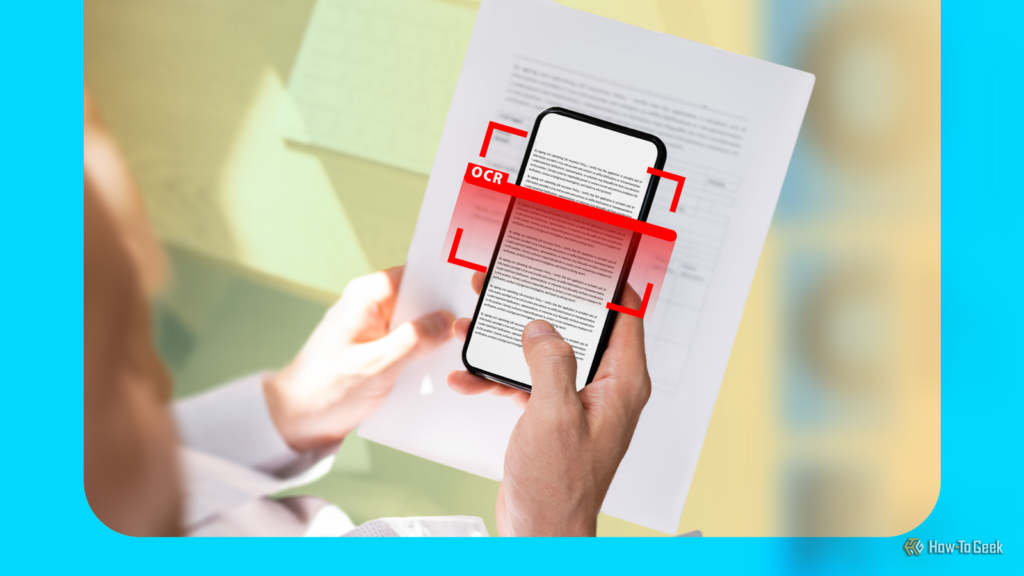
Modern Android phones are equipped with a variety of handy utilities that go beyond the typical features like the torch. Among these tools, users can convert any photo, webpage, or email into a PDF, extract text from images, and even scan QR codes. These functionalities can simplify everyday tasks, making our devices more powerful than we often realize.
📰 Table of Contents
Many newer Android devices, such as the Samsung Galaxy series and Google Pixel phones, come equipped with features that can significantly enhance productivity. For example, both brands have built-in capabilities for text extraction, allowing users to pull text from images with ease. This can be particularly useful for students, professionals, or anyone who frequently handles documents and notes.
On **Samsung Galaxy** phones, you can extract text directly from the camera app. Simply open the camera and point it at any text. As soon as the camera recognizes the text, a "T" icon will appear. Tapping this icon will prompt your phone to process the text, highlighting it for easy selection. Users can then copy or share this text effortlessly. This feature is similarly accessible in the Gallery app; just open a photo containing text, tap the "T" icon, and select the desired text.
**Google Pixel** owners can utilize the **Google Lens** feature to achieve the same results. The Google Lens icon can be found on the search bar at the bottom of the home screen. After granting the necessary permissions, users can either select an existing photo or use the camera to capture new text. Tapping the "Select text" button allows for text analysis, enabling options to copy, translate, or even have the AI read it aloud. This versatility makes it an invaluable tool for multilingual users or those who frequently reference text-heavy documents.
Converting Images and Documents into PDFs
Another practical feature of Android devices is the ability to convert images into PDFs quickly. Most gallery apps support this function, making it straightforward to save important images as PDF files. To convert a photo, open the image in the gallery, tap the three-dot menu, and select the Print icon. From there, choose the "Save as PDF" option, tap the PDF button, and designate where you’d like to save the file.
Additionally, users can save webpages and emails as PDFs. In **Google Chrome**, simply open the desired webpage, tap the three-dot button, select Share, and then Print. For emails in **Gmail**, open the email, press the three-dot menu, and choose the Print option to save it as a PDF. These features streamline the process of organizing and sharing important information.
Built-in QR Code Scanning
Most modern Android phones also include a built-in QR code scanner, available through the camera app or the Quick Settings panel. To scan a QR code, open the camera app and point it at the code; the device will automatically recognize it and prompt the user to take the appropriate action, whether it’s opening a link or accessing an app.
To add the QR scanner icon to the Quick Settings panel, Pixel users can pull down the panel, tap the Edit button, and add the icon. Samsung Galaxy users can follow the same steps, ensuring quick access to this handy tool. This feature has become increasingly important in our digital world, where QR codes are frequently used for various applications, from payments to event check-ins.
Measuring with Your Phone
One of the more innovative uses of smartphones is their capacity to function as measuring tools. Many newer Android devices support the **ARCore Depth API**, which enables augmented reality-based measuring apps. For instance, the **Measure** app on Google Pixel devices allows users to measure physical objects simply by moving the phone around the item. While older Pixel devices may not have direct access to the Measure app, newer models can still use it without issues.
For **Samsung Galaxy** users, the **Quick Measure** app can be downloaded from the Galaxy Store, although it might not be available in all markets. If that's the case, users can sideload the app from trusted sources like APKMirror. Once installed, measuring is as simple as following on-screen prompts to gauge dimensions accurately.
While third-party AR measuring apps exist, Google's Measure app is often recommended due to its simplicity and lack of intrusive advertising, making it a user-friendly choice for those needing quick measurements.
In conclusion, Android phones come packed with features that can significantly enhance everyday tasks. Whether extracting text, converting documents to PDFs, scanning QR codes, or measuring objects, these tools demonstrate that smartphones are not just for communication but can also be powerful productivity devices. By taking advantage of these functionalities, users can streamline various aspects of their work and personal lives, making technology work smarter for them.
Colombians Are Snatching Up US Homes at an Alarming Rate—Find Out Why This Could Impact YOU!

You Won't Believe How One Cake in the Park Event Raised Over $50,000 for Mental Health in Michiana!

Michael's Shocking Demand to Mario: Will This Bold Move Cost the King of Pop's Biopic $100 Million?

After 100 Investor Rejections, I Discovered 5 Shocking Secrets—#3 Will Change Everything!
Smartphone Giants Betray High-End Cameras: The Shocking Reason Behind DRAM Crisis You Must Know!

Florida Teens Charged for Wild Target Stunts: You Won't Believe What They Did!
You might also like: